Ollama 0.40.4: what's new and should you update?
Hello Folks,
We at Daily Techocracy are back with some juicy info for all you kind readers....lets get to it !!
Ollama has shipped five releases in under three weeks, and it's easy to lose track. Ollama is the free app that lets you run AI models on your own computer. Version 0.40.4 came out on 12 October. Here's what's new in it, what changed in the releases just before it, and whether it's worth updating now.
Quick answer: Ollama 0.40.4 adds "decision models" you can run from the terminal for yes/no questions, labels and scores. It also speeds up some Mac and NVIDIA setups and fixes a few bugs. If you use Ollama on a Mac, updating is a good idea. Since 0.40.3, the extra backup copies of models are no longer being created in the background.
What's new in Ollama 0.40.4?
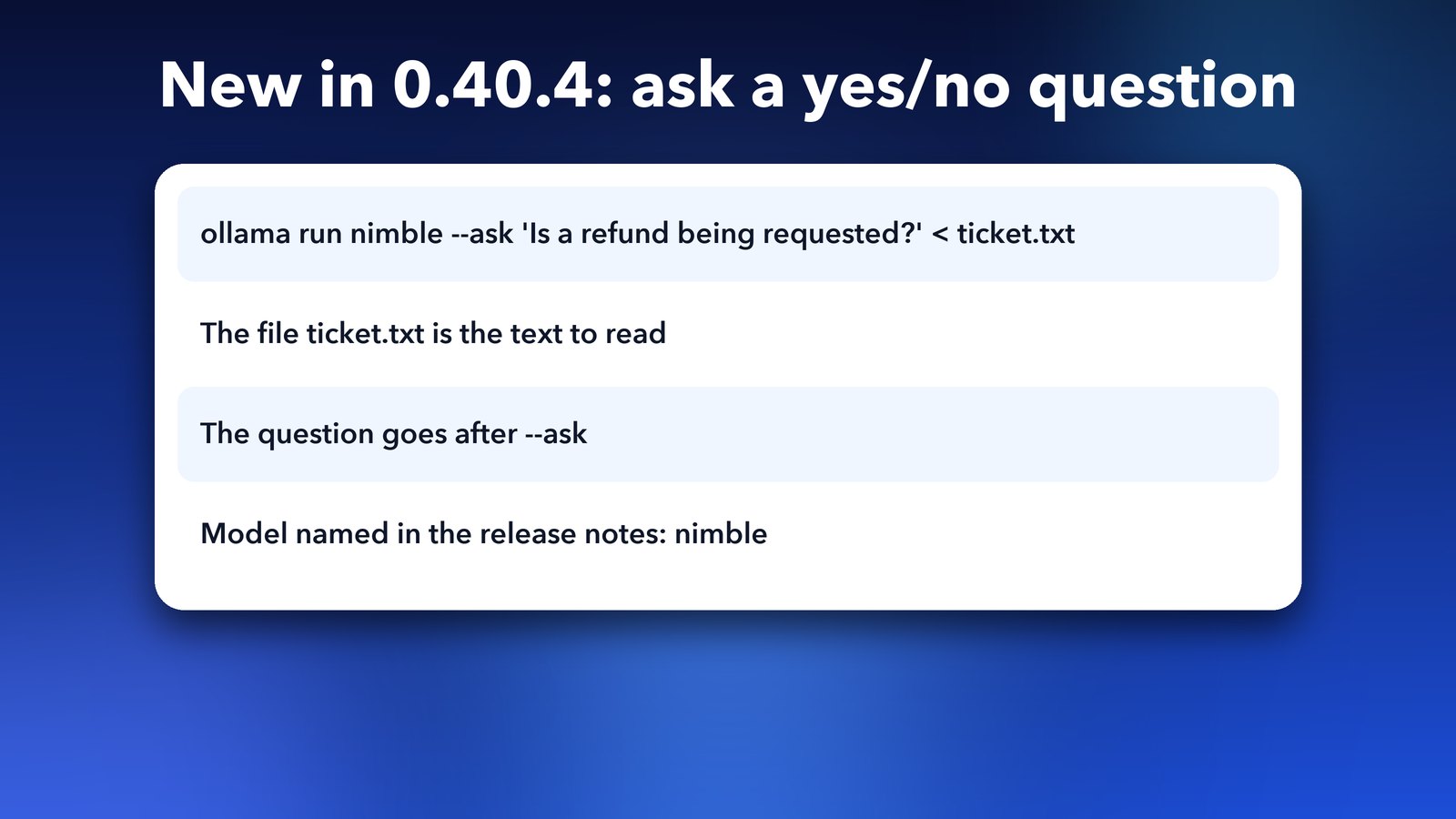
The big addition is support for decision models in the command line. According to the release notes on GitHub, you can now use ollama run to ask a yes/no question, sort text into labels, or score text against a rubric.
A normal chat model writes paragraphs. A decision model is meant to give you a short answer to a question you set. The release notes show this example:
ollama run nimble --ask 'Is a refund being requested?' < ticket.txtHere ticket.txt is the text to read, and the question goes after --ask. The notes name the model nimble in that example. I haven't run it myself yet, so check the release notes if you want the full details before you try it.
Is Ollama 0.40.4 faster?
In some cases, yes. The notes list several speed-related changes:
- Ollama reuses verified manifests and models that are already loaded, which makes inference faster.
- Decision models now run on the MLX runner on Apple silicon Macs. MLX is Apple's own framework for running AI on its chips.
- Gemma 4 prefill is faster on NVIDIA graphics cards when using MLX. Prefill is the step where the model reads your prompt before it starts answering.
- Speculative decoding on the MLX runner is more reliable. That's a trick where a small model guesses ahead to speed up a bigger one.
The notes don't give speed numbers, so I won't promise a figure. Your results will depend on your computer and the model.
What else changed in 0.40.4?
A few smaller things are worth knowing about:
ollama launch codexnow shows the models you have installed locally. Use/modelinside the Codex command-line tool to switch between them.ollama launchworks with usage credits, without upgrading to a paid plan.- Multimodal embeddings work through llama-server, and loading multimodal embedding models with small context windows is fixed.
- llama.cpp, the engine under Ollama, has been updated with native support for decision models.
- The README and docs now explain privacy and cloud services more clearly.
What changed in Ollama 0.40.0 to 0.40.3?
Here is the short story of the whole 0.40 series. The releases before 0.40.4 matter too, because some of them changed how your disk and speed behave.
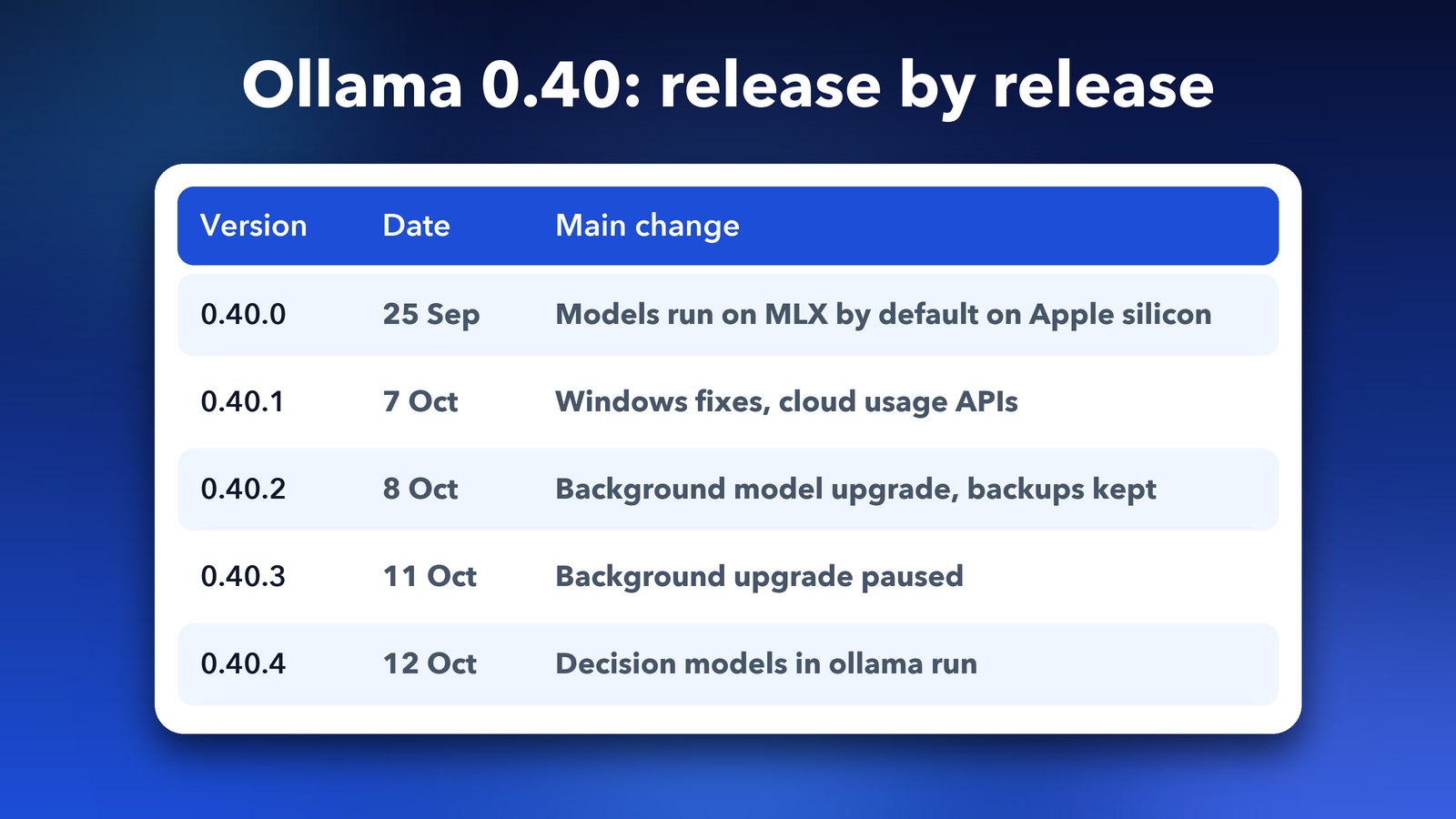
Ollama 0.40.0, released on 25 September, made models run on MLX by default on Apple silicon for supported architectures. Gemma 4, Qwen 3.6 and Qwen 3.5 were among the models that moved over. We covered that change in Ollama 0.40 makes local AI models nearly 2x faster on Macs.
Version 0.40.1 (7 October) fixed a Windows problem with reads past 2 GiB. Version 0.40.2 (8 October) began upgrading old models in the background and kept the originals as backups. That's the one that quietly ate disk space, and we explained how to get it back in how to free disk space after Ollama 0.40.2 upgrades models.
Version 0.40.3 (11 October) paused that background upgrade.
Should you update to Ollama 0.40.4?
For most people, yes. If you're on a Mac with Apple silicon, you get the MLX improvements and the fixes from the whole 0.40 series. If you were hit by the disk-space issue, updating stops it from happening again, though it won't remove backups that already exist.
The one reason to wait is if your setup is working perfectly and you rely on it for work. In that case, update on a quiet day and keep a note of your current version first. The 0.40.2 notes warn that going back below 0.40 means re-downloading those upgraded models.
How to update Ollama
On a Mac or Windows PC, the Ollama app can update itself. You can also download the latest installer from the Ollama docs site. To check which version you have, open Terminal and run:
ollama --versionIf it says 0.40.4 or higher, you're up to date.
Local AI moves quickly at the moment, so a quick check every week or two is enough. We'll keep an eye on what's next.
Image credits: MacBook Air (13-inch, M4) photo by AzureSaturn via Wikimedia Commons (CC0). Ollama logo via Wikimedia Commons (MIT). Other images made by Daily Techocracy.