How to fix Office 2021 for Mac asking for Microsoft 365
Hello Folks,
We at Daily Techocracy are back with some juicy info for all you kind readers....lets get to it !!
You paid for Office 2021 once, it worked for years, and then one morning Word or Excel on your Mac says you need a Microsoft 365 subscription. You can open your files, but you can't save them. You're not alone. This week the r/mac subreddit filled up with posts like "never buying Office again", after people lost hours of work they couldn't save. Here is what is going on, how to get editing back today, and what to do next.
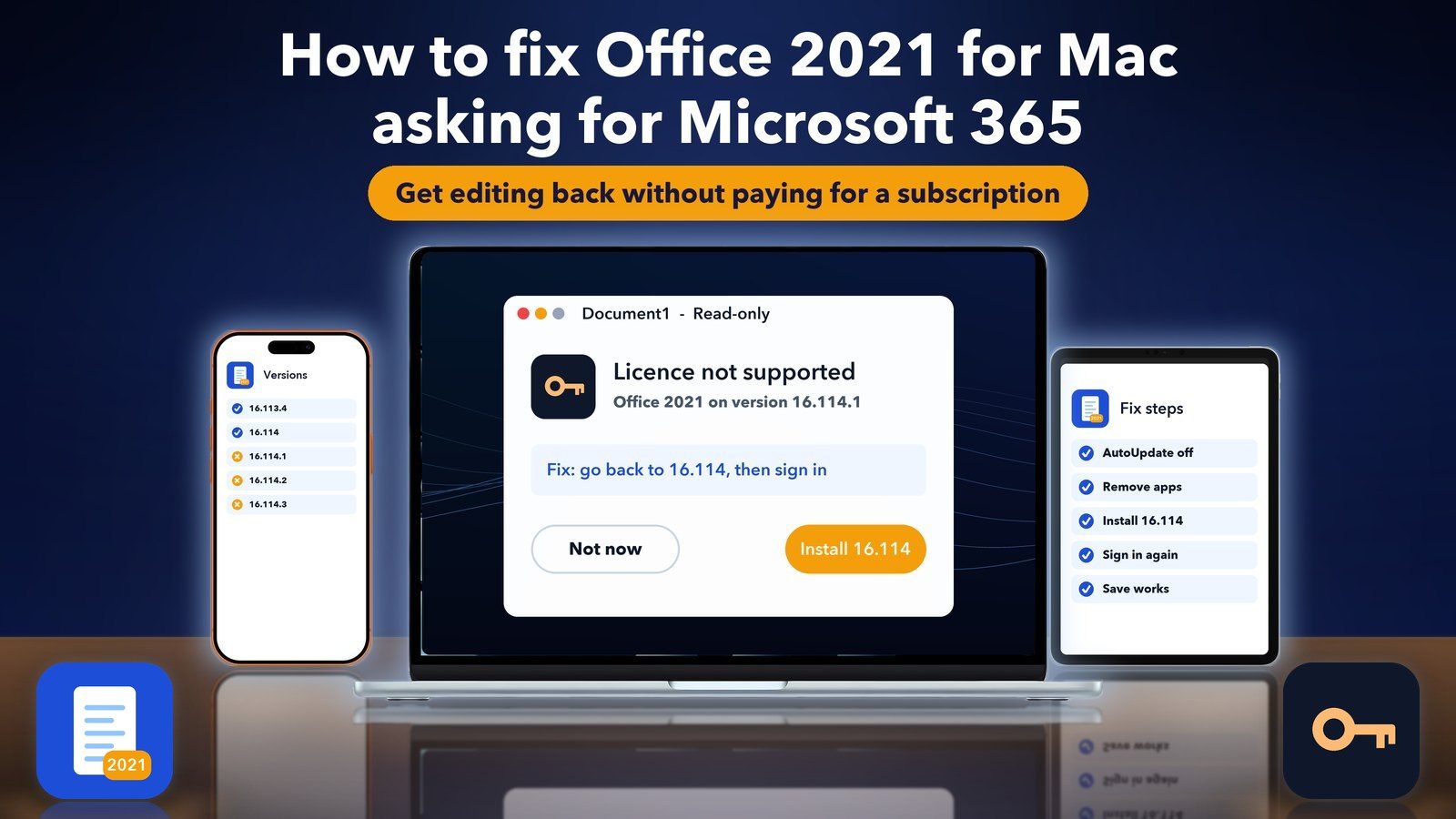
Quick answer: Office 2021 for Mac reached its end of support on 13 October 2026. Users report that version 16.114.1 and later no longer accept a 2021 licence, so the apps drop to view-only and ask for Microsoft 365. To fix it, turn off Microsoft AutoUpdate, remove the Office apps, install the full 16.114 package from Microsoft's update history page, and sign in again.
Why is Office 2021 for Mac asking for Microsoft 365?
Office 2021 for Mac is asking for Microsoft 365 because it is now past its end of support date, and the newest Office updates no longer recognise the 2021 licence. Your licence has not been cancelled. The app you updated to simply doesn't accept it, so it falls back to a mode where you can read but not edit.
Here is the background in plain words. Microsoft ships one Office app for Mac. The same Word or Excel works for both Microsoft 365 subscribers and people who bought Office once. The licence on your Mac tells the app which one you have.
Microsoft's end of support page for Office 2021 says support ended on 13 October 2026. It also says your Office 2021 apps "may continue to function". The catch is that Microsoft AutoUpdate kept pushing new versions after that date, and those newer versions are where the trouble starts.
Microsoft has not published a note naming the exact version. Users on the MacRumors forums and a Polish licence seller's help page agree on the pattern, though:
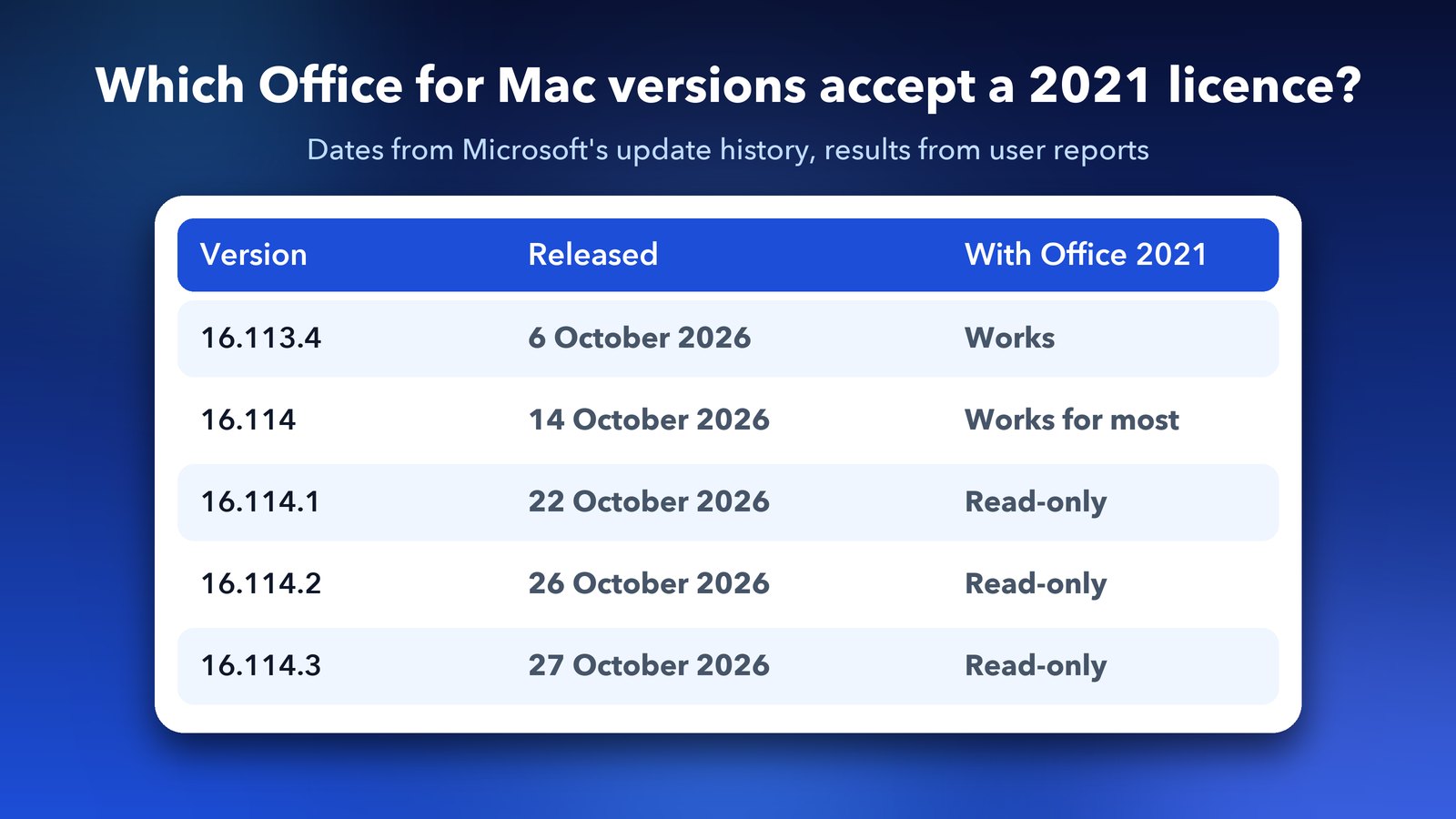
- 16.114 (14 October 2026) still works with an Office 2021 licence for most people.
- 16.114.1 (22 October) and later show messages like "Your Office 2021 license is not supported in this version of the app" or "No licenses found". Your documents then open read-only.
One MacRumors user first blamed 16.114, then reinstalled it and found it worked fine. They pointed to 16.114.1 as the real culprit. A few people went back further, to 16.113.4, to be safe.
How to check which Office version and licence you have
Open Word, click Word in the menu bar, then choose About Word. The window shows the version number and the type of licence. That is where Microsoft's own support page tells you to look. If it says 16.114.1, 16.114.2 or 16.114.3 and you own Office 2021, you've found the cause.
While you're there, think about how you bought Office. Two cases are different:
- Office 2019 for Mac. Sadly, no fix exists. Office 2019 went into read-only mode on 13 July 2026, when its licence certificate expired. Microsoft says updating or reinstalling won't help.
- Office 2024 or Microsoft 365. These are still supported, so the steps below don't apply. If you see this prompt with one of them, jump to the licence clean-up section further down.
How to fix Office 2021 for Mac asking for a subscription
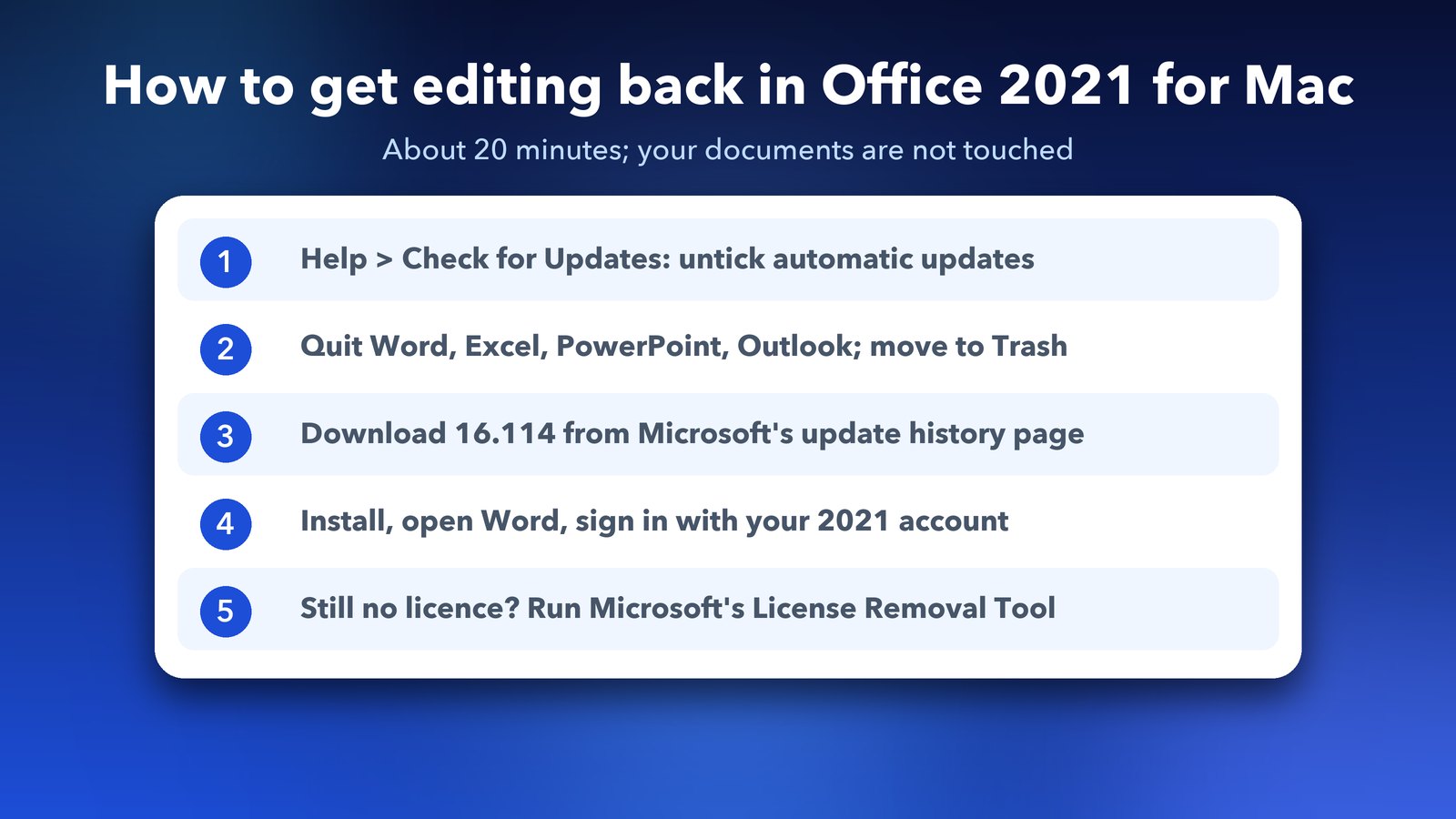
The fix is to step back to a version that still accepts your licence, and to stop it from updating again. It takes about 20 minutes. Your documents are not touched, but back up anything important first.
- Turn off automatic updates. Open Word, choose Help > Check for Updates, and untick "Automatically keep Microsoft Apps up to date". Don't click Update. If you can't find it there, go to Apple menu > System Settings > General > Login Items & Extensions and turn off Microsoft AutoUpdate under "Allow in the Background".
- Quit and remove the apps. Quit Word, Excel, PowerPoint and Outlook. Then drag them from the Applications folder to the Trash.
- Download version 16.114. Open Microsoft's update history for Office for Mac, find the row for 14 October 2026 (version 16.114, build 26101123) and download the full Office suite installer. Don't use office.com or the Mac App Store. Both give you the newest version.
- Install and sign in. Run the installer, open Word and sign in with the Microsoft account you used to buy Office 2021. If you're asked to pick a licence, choose Office 2021.
- Test a save. Make a small change in a document and save it. If saving works, you're done.
If 16.114 still won't take your licence, repeat the same steps with 16.113.4 from 6 October 2026. Keep the installer file you download somewhere safe. Microsoft could remove older builds from that page later.
What if Office still says no licence was found?
If Office still asks for a subscription after the reinstall, an old licence file on your Mac is probably getting in the way. Microsoft has a small tool for this. Throwing the apps in the Trash leaves those licence files behind, so a plain reinstall doesn't clear them.
- Quit all Office apps.
- Download Microsoft's License Removal Tool and open the .pkg file from your Downloads folder. If macOS warns about an unidentified developer, Control-click the file and choose Open.
- Click Continue, then Install, and type your Mac password if asked. Click Close when it's done.
- Open Word and sign in again with the account tied to your Office 2021 purchase. Then restart your Mac.
Be careful with this one. The tool removes every Office licence on the Mac, not only the broken one. Check that you know your Microsoft account email and password before you run it. A user on Apple's forums also hit "no licenses found" because the same Office 2021 key was still in use on an old PC. If that sounds like you, release it from the old computer first.
Still stuck? Three more checks
Most people are back to editing after the rollback. If you're not, these checks have worked for others on Microsoft's Q&A forum.
- Allow Microsoft's licensing helpers: go to Apple menu > System Settings > General > Login Items & Extensions. Under Allow in the Background, turn on Microsoft Corporation and Microsoft Office Licensing if they're listed and switched off. Leave Microsoft AutoUpdate off. Restart your Mac and open Word again.
- Check the purchase is on your account: sign in at account.microsoft.com and open Services & subscriptions. Office 2021 should be listed there. If it isn't, you may be signing in with a different Microsoft account from the one you bought it with.
- Ask Microsoft for a licensing case: if Office 2021 shows on your account and 16.114 still refuses it, contact Microsoft Support and ask for a licensing case. Mention the exact message and your version number from Word > About Word.
Microsoft hasn't published an official note calling 16.114.1 a bug, and later builds such as 16.114.2 haven't been confirmed to fix it. So don't turn AutoUpdate back on to "test" a newer version unless you're happy to repeat the rollback.
Is it safe to keep using Office 2021 on an old version?
It works, but it's a stopgap, not a long-term home. Office 2021 gets no more security updates, so any new security hole in Word or Excel will stay open on your Mac. Opening documents from strangers is the biggest risk. Files you made yourself are far safer.
There is a second problem. Turning off AutoUpdate also stops fixes for other Microsoft apps on your Mac, like Teams or Edge, if you use them. Check those apps for updates by hand now and then.
My honest take is to use the rollback to get your work saved today, then pick a proper long-term option in the next few weeks.
What are the best alternatives to Office 2021 on a Mac?
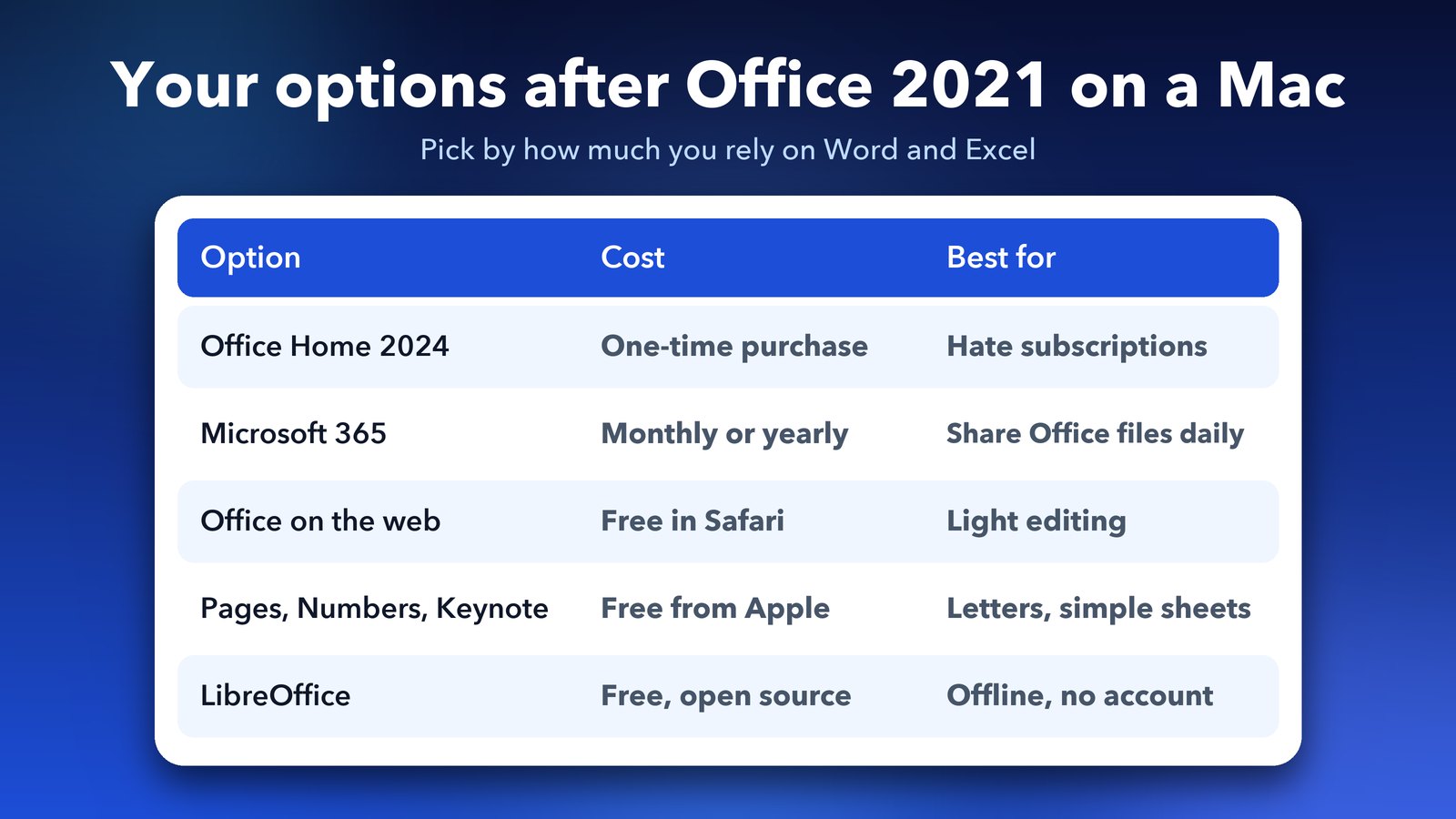
You have five real choices, and two of them are free. Which one suits you depends on how much you depend on Word and Excel formatting.
- Office Home 2024. This is a one-time purchase that Microsoft still supports. It suits you if you hate subscriptions. Office 2024 will reach its own end date one day, too.
- Microsoft 365. This is a monthly or yearly plan that always gets updates. It's the best choice if you share Word and Excel files every day.
- Office on the web. Microsoft's free web versions of Word, Excel and PowerPoint run in Safari. They have fewer features, but they edit normal Office files.
- Pages, Numbers and Keynote. Apple's own apps are free on every Mac. They open and export Word, Excel and PowerPoint files. Complex spreadsheets with macros may not convert well.
- LibreOffice. This is a free, open-source office suite that handles Office files well.
For most home users who just write letters and keep a budget sheet, Pages and Numbers are enough. Small business owners who swap files with clients all day will be happier on Microsoft 365 or Office 2024.
Will Microsoft fix Office 2021 for Mac?
Don't count on it. Microsoft's support page says the end of support date has no extension and no paid extended updates. The company's advice is to move to Microsoft 365 or buy Office 2024. Office 2019 got no reprieve when its certificate expired in July, and that is the clearest sign of how Microsoft handles older one-time versions.
If you're tidying up your Mac after all this, our guide on what the macOS 27.2 update fixes is a good next read. If old installers are eating your disk, see how to free up System Data storage on macOS 27.
The short version is to roll back to 16.114 to save your work today, then choose where your documents will live next. Your files are fine. Only the app needs sorting out.
Frequently asked questions
Why does Office 2021 on my Mac say my license is not supported?
Office 2021 for Mac reached end of support on 13 October 2026. Users report that Office version 16.114.1 and later no longer accept a 2021 licence, so Word and Excel open documents read-only and ask for Microsoft 365.
How do I get Office 2021 working again on my Mac?
Turn off Microsoft AutoUpdate, remove the Office apps, install the full 16.114 package (14 October 2026) from Microsoft's update history page, and sign in with the account you bought Office 2021 with.
Will updating Office fix the Office 2021 licence problem?
No. The newer updates are what cause it. Keep AutoUpdate turned off and stay on 16.114 or 16.113.4 until you move to another option.
Is it safe to stay on an old version of Office 2021?
It works, but Office 2021 no longer gets security updates. Be careful opening documents from people you don't know, and plan a move to Office 2024, Microsoft 365 or a free alternative.
Does this also affect Office 2019 for Mac?
Office 2019 for Mac went read-only on 13 July 2026 when its licence certificate expired, and Microsoft says reinstalling won't help. The rollback only works for Office 2021.
Image credits: MacBook Air M4 render, iPhone 17 Pro vector (TheGoldenBox) and iPad Pro 11 mockup (Jem Riggs) from Wikimedia Commons (CC BY-SA 4.0), with illustrated screens and a custom wallpaper. Document and licence tiles are original illustrations by Daily Techocracy.