How to fix an iPhone Duo screen that cracks or shows lines
Hello Folks,
We at Daily Techocracy are back with some juicy info for all you kind readers....lets get to it !!
The iPhone Duo only reached customers on 23 October, and some owners have already found a crack or a line on the inner screen. Posts about it filled the iPhone subreddit this week. If your Duo has this problem, you can't fix it yourself, but Apple has said it will help. Here is what Apple has said, what to do first and how to ask for a replacement.
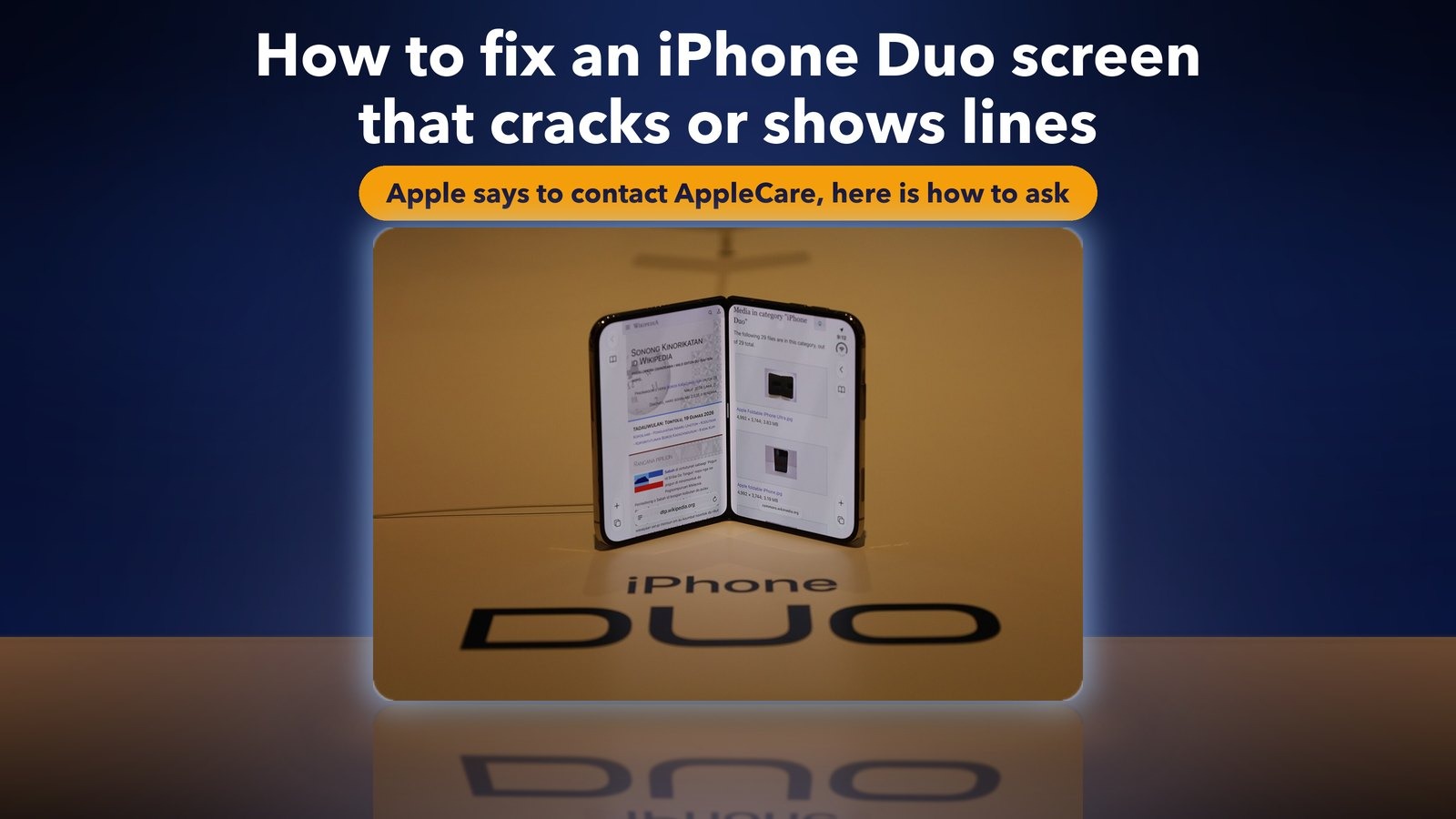
Quick answer: If your iPhone Duo's inner display has a crack, a line near the hinge or a strip of bright pixels, contact AppleCare for a replacement. Apple said on 26 October that it knows about the problem on "a small number" of units, and you don't need AppleCare+ to ask. Back up the phone, take photos of the screen, then contact Apple directly, even if you bought from a carrier. Don't use a third-party repair shop first.
What is the iPhone Duo screen problem?
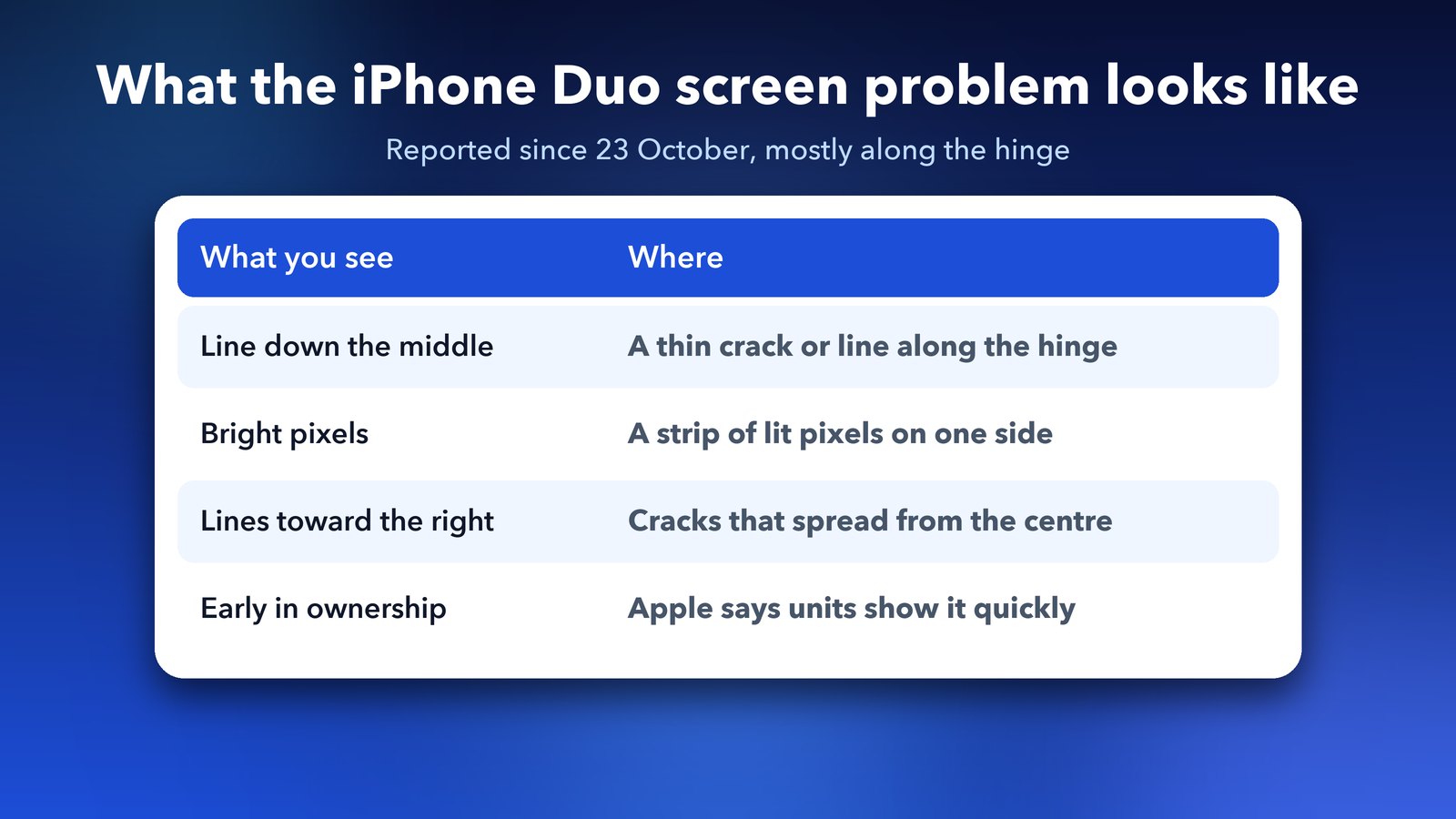
Some iPhone Duo owners found cracks or lines on the inner screen, mostly along the hinge in the middle. The reports began around 23 October, the day the phone started arriving. Apple confirmed the issue three days later.
Here is how the reports describe it. People saw lines running down the middle of the screen and toward the right side. MacRumors also described a line of bright pixels across one side. Apple says affected phones tend to show the fault quickly after people start using them. That fits the timing, since the phone is only a week old.
One honest warning. 9to5Mac noted that some of the screen reports on Reddit were AI-made fakes. Plenty of real owners have the problem too, and Apple's own statement proves it. Still, look at your own phone before you panic. A smudge, a screen protector edge or a reflection can look like a line.
What has Apple said about the iPhone Duo screen?
Apple's public line is short. It says it is "aware of an issue impacting the inner display on a small number of iPhone Duo units" and that affected owners should contact AppleCare for a replacement. Apple also says most Duo units don't have the problem.
A few more facts come from reports on that statement and a memo Apple sent to its stores:
- You don't need AppleCare+ to ask for the replacement.
- If you bought the phone from a carrier, contact Apple directly, not the carrier.
- On 30 October, MacRumors reported that Apple told its stores and authorised repair providers to inspect the phone and then repair or replace it under their standard procedures.
- Apple hasn't announced a recall or a public repair program.
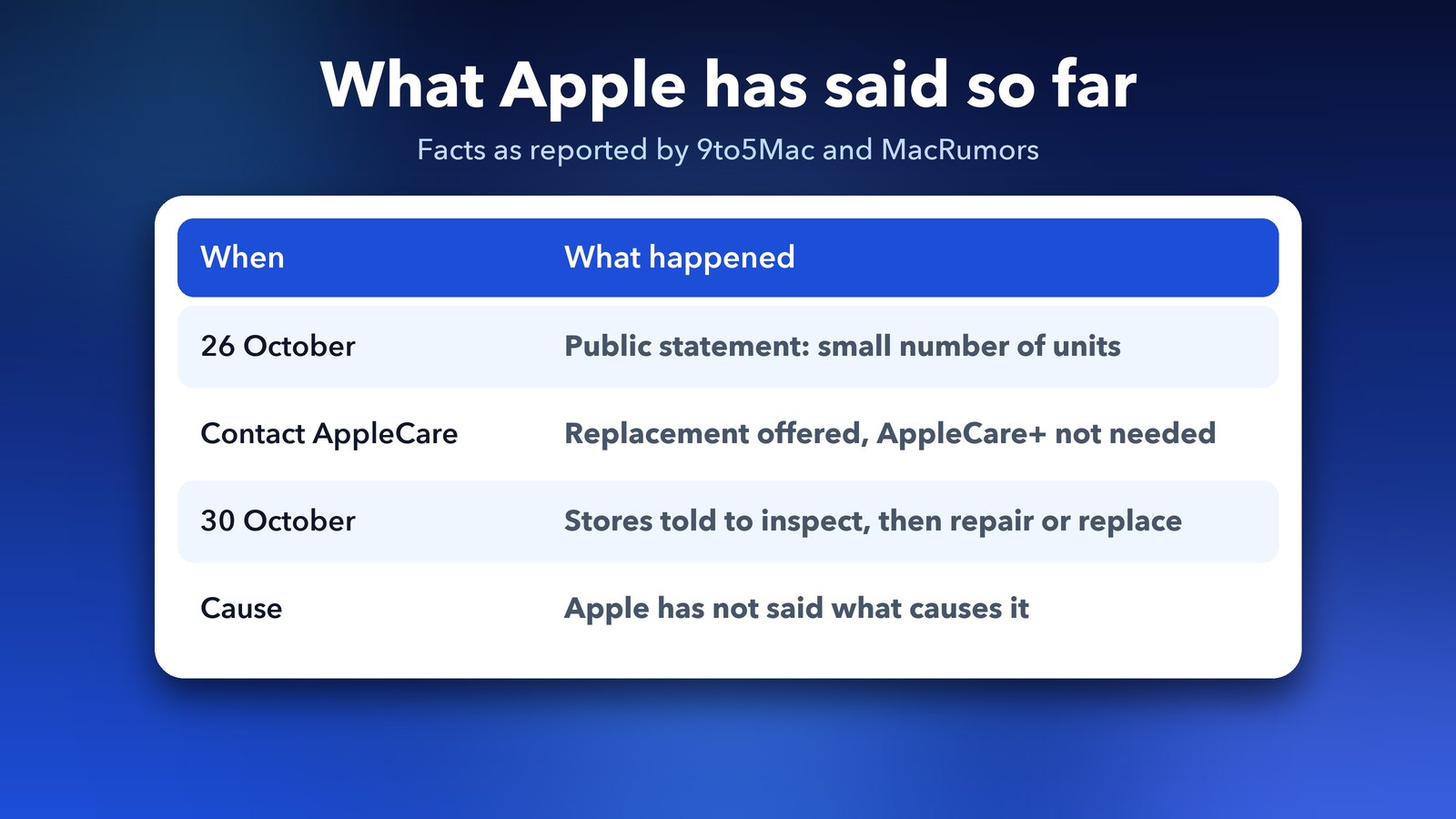
Apple hasn't said what causes the fault. Teardown site iFixit suggested on 25 October that a faulty hinge is the likely cause. That is an outside opinion and not an Apple finding, so treat it as a clue and not a fact.
How to get your iPhone Duo screen replaced
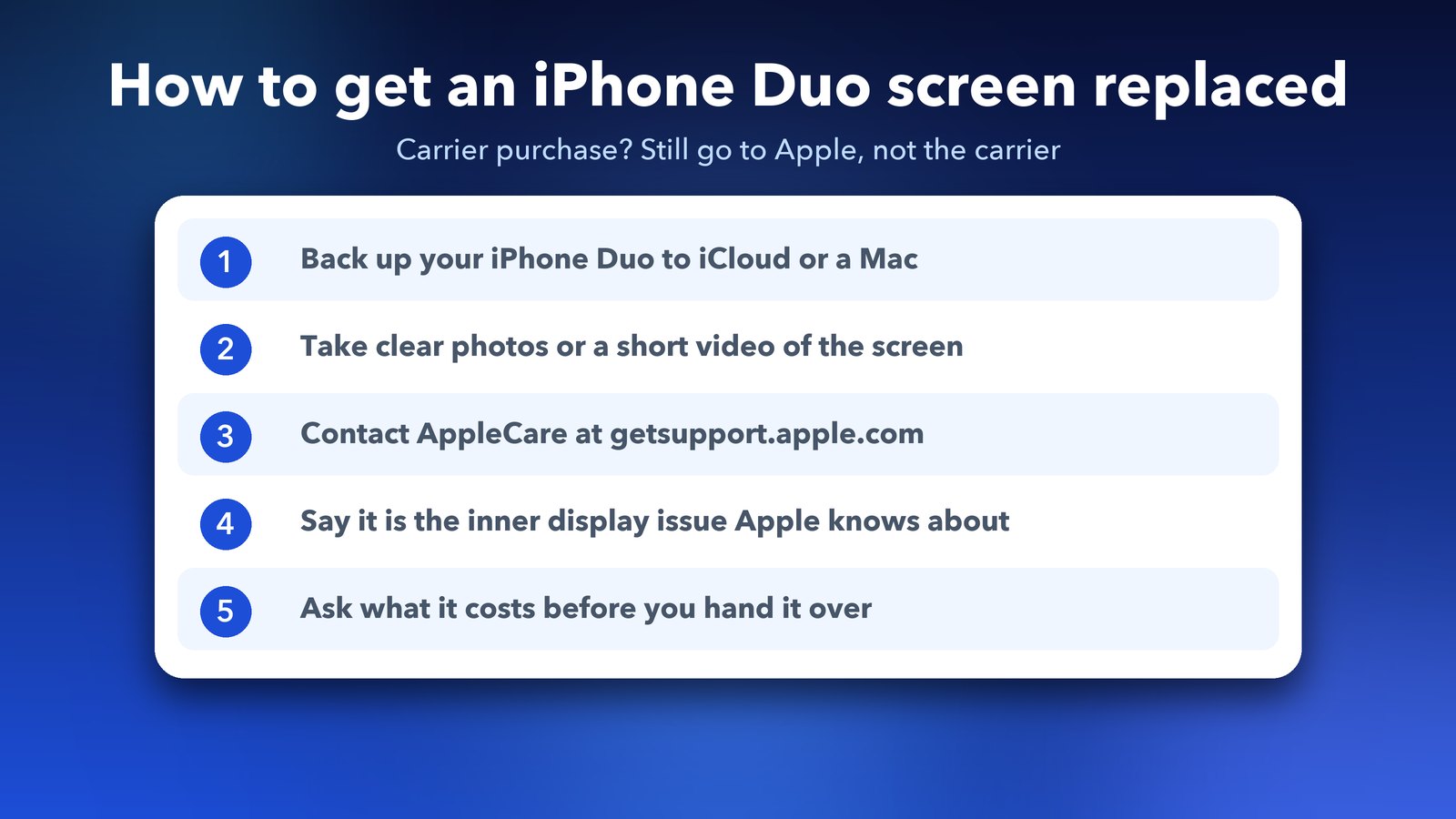
Contact Apple through its support site or by phone, describe the inner display problem and ask for a replacement. Do this soon, because the fault is still new and Apple is clearly handling it.
Step 1: Back up your iPhone Duo
Back up before anyone touches the phone. Apple may replace the whole unit, and you'd lose anything that isn't saved. Open Settings, tap your name, tap iCloud and check that the iCloud backup is on, or connect the phone to a Mac and back up there. Apple's page on backing up your iPhone covers both. If the screen is badly damaged, a Mac backup is easier than tapping through menus.
Step 2: Record what the screen looks like
Take clear photos or a short video with another phone or camera. Show the line or crack in good light. This gives you proof if the fault changes or worsens, and it shows the problem is not accidental damage.
Step 3: Contact AppleCare
MacRumors lists Apple's support site at getsupport.apple.com/products, and the phone number 1-800-APL-CARE in the US and Canada. In other countries, use Apple's support site and pick your country. Choose iPhone Duo and describe the problem in your own words.
Step 4: Name the problem Apple already knows
Say it is the inner display problem Apple acknowledged on 26 October. Use those words, since they match Apple's own statement and help the agent route you correctly. You can also mention the date you got the phone.
Step 5: Ask what it will cost before you agree
Apple's statement says replacement, but it doesn't spell out the price for every case. One site says an out-of-warranty inner screen repair costs $999, but I couldn't confirm that from Apple, so treat it as unverified. Ask the agent in writing whether your case is covered at no charge. A new phone is inside Apple's one-year limited warranty, which normally covers a defective part.
Should you get the iPhone Duo screen repaired by someone else?
No, not before you have asked Apple. A repair from a third-party shop could complicate your claim with Apple. Tech Insider makes the same point. Apple has told its own stores to handle the problem, so let them.
The same goes for pressing on the hinge, bending the phone to "test" it or peeling the screen. If a crack is real, extra pressure can make it worse. Keep the phone closed in a case or a soft pouch until your appointment.
What should you do while you wait for the replacement?
Keep using the phone gently, and stop if the line grows or the screen starts to flicker. Apple hasn't said that a cracked inner display is unsafe to use, but a crack can spread, and dust or moisture can get in.
- Use the outer screen for calls, messages and quick jobs, and open the phone only when you need to.
- Don't press on the crack, and don't use a sharp stylus or a fingernail near it.
- Keep the phone away from heat, such as a car dashboard, because the hinge area is already under stress.
- Write down your serial number and keep your order email. Both speed up the call.
- If Apple gives you a case number, save it. It lets the next agent see what was said before.
Other owners have also posted about a small bump near the hinge and a "Camera Unknown" message that came and went after a restart. These are single user reports that I couldn't confirm anywhere official. If you see them, mention them to Apple at the same time, but don't assume they mean the same fault.
Which iPhone Duo owners should worry?
Apple says most owners are safe. If your inner screen looks clean today, there is nothing to do except look after the phone and keep your receipt and serial number somewhere safe.
It helps to know what to watch for. Open the phone on a plain white page, such as a blank note, and look along the hinge in good light. A thin line, a row of bright pixels or a hairline crack is the sign. Check again after a day or two, since Apple says the fault appears early.
Is the iPhone Duo still worth buying?
That depends on how risk-averse you are. Apple's quick statement and store memo suggest it intends to stand behind the phone. But a first-generation folding phone that already has a known screen fault is a fair reason to wait a few weeks.
If you're still deciding, our guide to iPhone Duo pre-orders, price and release date has the price and the dates. A sensible middle path is to buy from Apple directly, keep the return window in mind, and test the inner screen carefully in the first few days.
Where do you find the official words?
Apple's support pages are the place to confirm what is covered in your country. Start at Apple's iPhone repair page. Statements and prices can differ by region, and Apple may update its guidance as more units come in.
To sum up, a cracked or lined Duo screen is a known issue, and Apple has told owners to contact AppleCare. Back up, take photos, say the right words and ask about cost first. If this post helped, our iPhone touchscreen fix for iOS 27 covers a different problem that can look similar but is a software freeze.
Image credits: iPhone Duo photo from the Apple Store launch (Wikimedia Commons, user EmpAhmadK, CC0). Icons and panels are original illustrations by Daily Techocracy. Sources: 9to5Mac (26 October), MacRumors (30 October), Fox News, Forbes.