How to fix iOS 27 battery drain on your iPhone
Hello Folks,
We at Daily Techocracy are back with some juicy info for all you kind readers....lets get to it !!
If your iPhone seems to lose charge faster since you installed iOS 27, you're far from the only one. Since September, owners have posted about faster drain, heat and odd restarts. The good news is that most cases come down to a short list of causes, and you can check them in about ten minutes. Here is the order I'd work through them.
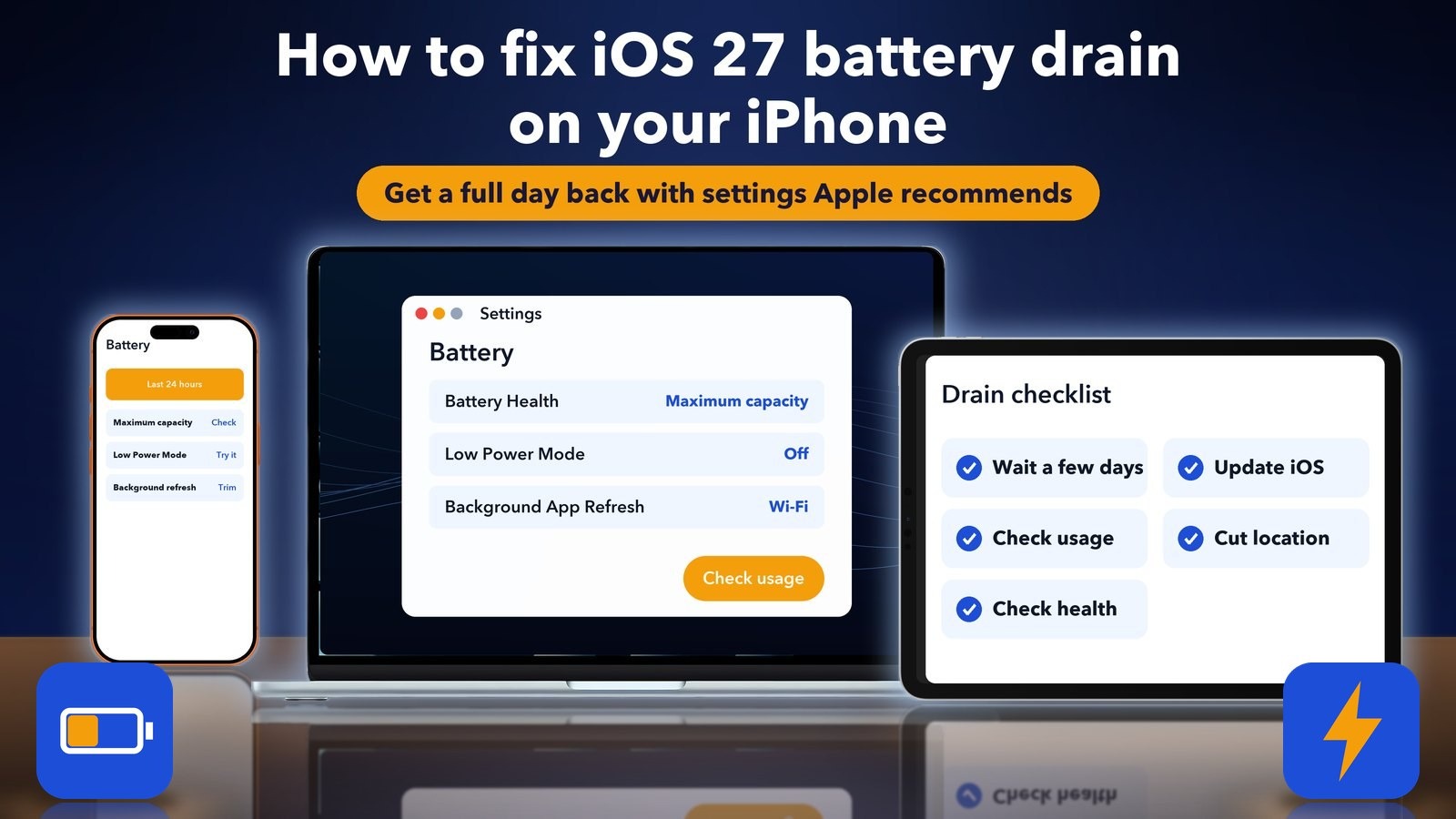
Quick answer: Give the phone three to five days after the update, then install the newest iOS (iOS 27.2 came out on 26 October). Open Settings > Battery to see which app uses the most power, trim Background App Refresh and Location Services, and turn on Low Power Mode when you need it. If the drain stays bad, check Battery Health. A battery below about 80% capacity may simply be worn.
Is iOS 27 really draining batteries?
Some people report it, but I couldn't find a confirmed iOS 27 battery bug from Apple. Reports on news sites and forums mention faster drain, heat and random restarts, and one outlet says its own readers saw them. These are user reports, not proof of a single fault in the software.
It also helps to know what Apple has shipped. iOS 27.0.1 arrived on 28 September, iOS 27.1 on 23 October and iOS 27.2 on 26 October, according to Apple's own list of security releases. One third-party summary says 27.0.1 made no change to battery life. I couldn't find Apple wording that promises a battery fix in 27.1 or 27.2, so don't expect the update alone to solve it.
My honest read is that two things overlap. A few phones may have a real bug, and many more are simply busy after an update. Both are worth checking, in the order below.
Step 1: Wait a few days after the update
A phone that just updated often works harder for a few days, so wait before you change anything. Several guides suggest three to five days. After a big update the phone may re-index photos and files and refresh apps in the background. That is a common explanation, not an Apple statement, but it matches what many people see.
During the wait, plug the phone in overnight on Wi-Fi so it can finish its tasks. If the battery is still falling quickly after a week, move on to the next steps.
Step 2: Install the latest iOS update
Open Settings, tap General, tap Software Update and install what it offers. If you are still on 27.0 or 27.1, you are missing fixes. iOS 27.2 is the newest release as of 31 October.
Updates also come with security fixes, so this step is worth doing even if your battery turns out fine. If the update itself hangs, our guide on iOS 27 stuck on Update requested explains what to do.
Step 3: Find the app that uses the most battery
Go to Settings > Battery and look at the list of apps. Apple says this screen shows each app's share of battery use. One app with an unusually high share is usually the cause.
Look at the last 24 hours first, then the last 10 days. If a single app, such as a social app or a map app, takes far more than the rest, update it from the App Store. If it still drains the battery, delete it and install it again. Also check whether the app is running when you aren't using it. Time on the screen is normal. Time in the background is the red flag.
Step 4: Trim background refresh and location
These two settings are the usual hidden drains, and Apple names both on its battery tips page. Fix them with these paths:
- Background App Refresh: Settings > General > Background App Refresh. Choose Wi-Fi, or Off, or switch off single apps you don't need updating all day.
- Location Services: Settings > Privacy & Security > Location Services. Set apps that don't need it to Never, and set the rest to While Using the App.
- Low Power Mode: Settings > Battery. Apple says it lowers brightness, limits background activity and turns off by itself when you charge.
- Brightness: drag the Brightness slider down in Control Center, or turn on Auto-Brightness.
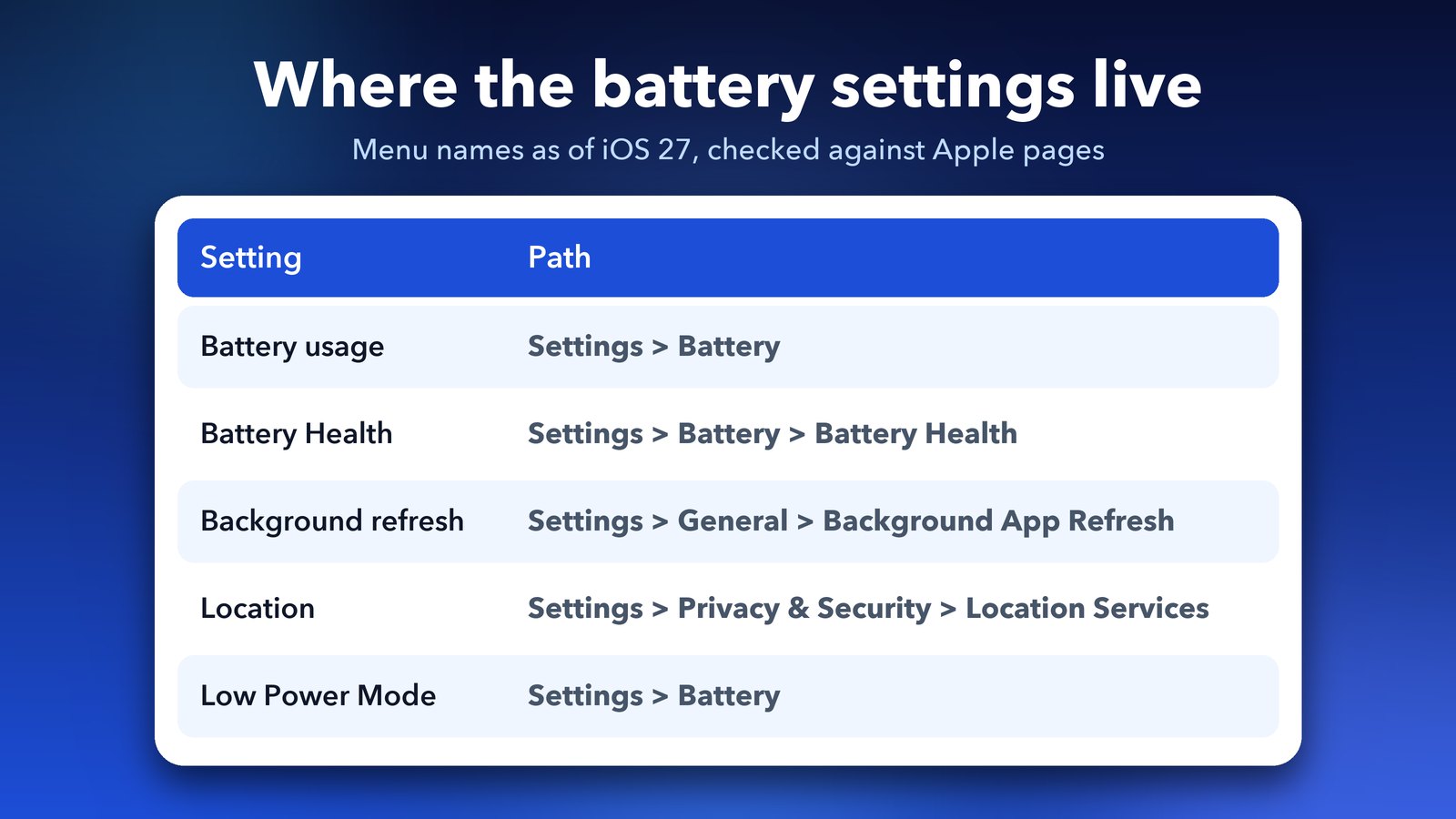
Apple's page on maximising battery performance lists these tips. The names of menus can change a little between iOS versions, so if you can't find one, use the search box at the top of Settings.
Low Power Mode is a stopgap, not a fix. It's handy for a long day out, but if you need it every afternoon, the cause is still there.
Step 5: Check Battery Health
If the battery drains fast on any iOS version, the battery itself may be worn. Go to Settings > Battery > Battery Health. Apple says Maximum capacity compares the battery with how it was when new, and a lower number means fewer hours between charges.
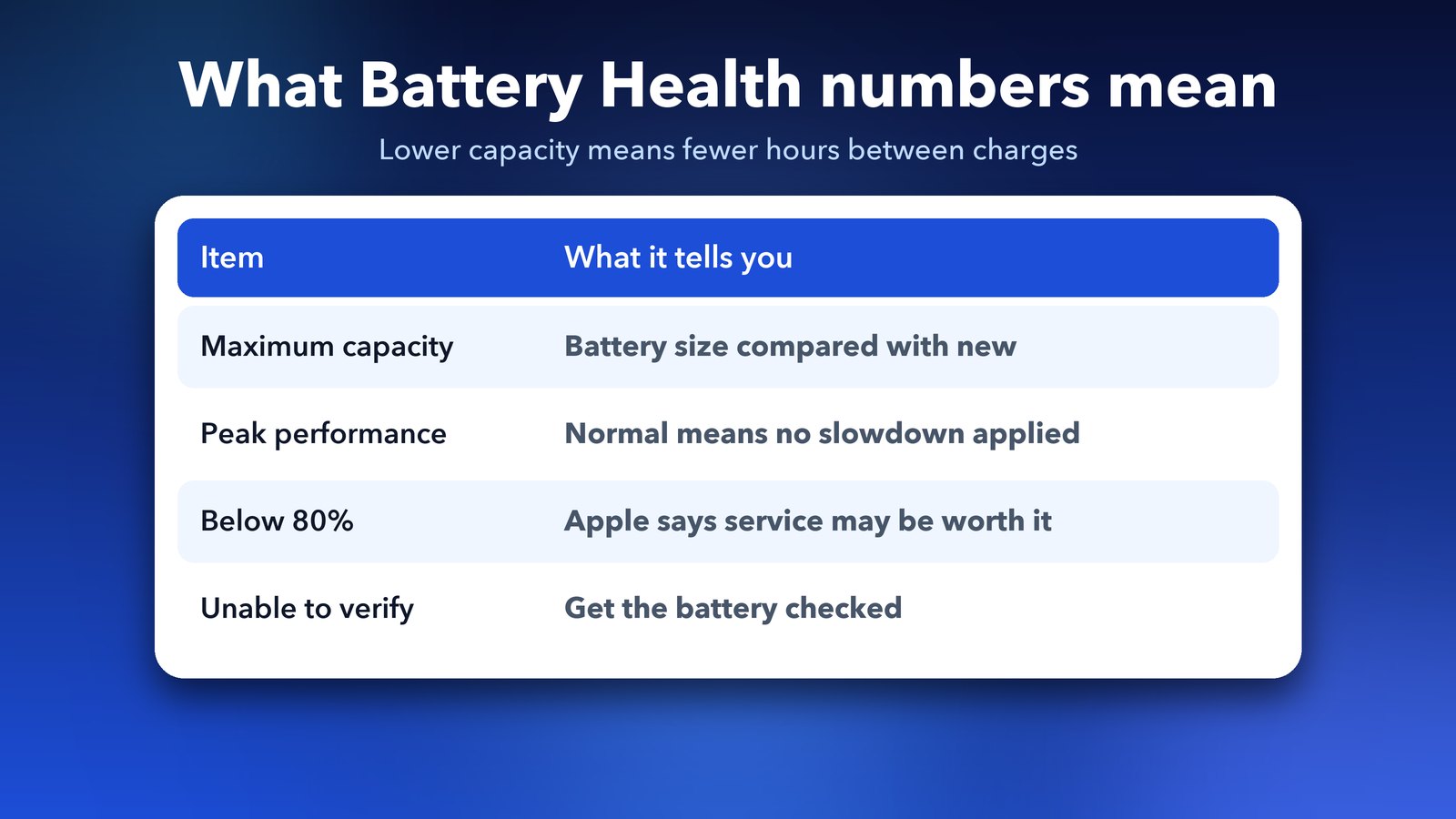
Here is how to read it:
- Maximum capacity: a lower number means the battery holds less than it used to.
- Peak Performance Capability: "normal" means the phone isn't slowing itself down to protect the battery.
- Around 80% or lower: many guides and Apple Community replies treat this as the point where a replacement starts to make sense. I couldn't find the exact 80% line on Apple's current support page, so treat it as a rule of thumb.
- Unable to verify: Apple says the battery may not be a genuine Apple one, and the health data may be wrong.
One more tip from forums is that the capacity figure can shift after an update, since the phone recalculates it. That is a single-source idea, so I wouldn't read too much into a small drop right after updating.
Which everyday habits save battery on any iPhone?
A few small habits help more than people expect, and Apple lists most of them. None of them need a special setting hunt.
- Use Wi-Fi when you can. Apple says Wi-Fi uses less power than cellular. In a weak-signal area, Airplane Mode stops the phone from searching hard for a network all day.
- Keep Optimized Battery Charging on. Apple says it learns your routine and may wait to finish charging to 100% until shortly before you need the phone, which is gentler on the battery.
- Don't store the phone full or empty. For long storage, Apple suggests about half charge, in a cool and dry place.
- Dim the screen. The display is one of the biggest power users, so a lower brightness often gives the quickest win.
Does heat make iOS 27 battery drain worse?
Yes, heat is a real battery killer. Apple says the best room temperature for an iPhone is between 16 and 22 degrees Celsius, and that going above 35 degrees can permanently reduce the battery's capacity.
Don't leave the phone in a hot car or in direct sun, and don't charge it under a pillow. Apple suggests taking off certain cases if the phone gets warm while charging. If the phone feels hot while you aren't using it, that points to an app working in the background, so go back to Step 3.
What if the drain still won't stop?
Restart the phone first, since it clears stuck background tasks. If that doesn't help, you have a few options, from least to most effort:
- Update or delete the one app that tops the battery list.
- Go to Settings > General > Transfer or Reset iPhone > Reset > Reset All Settings. This keeps your data but resets settings such as Wi-Fi, so you'll need to set those up again.
- Back up the phone and contact Apple Support. If the battery health is low, a battery service is the real fix. Apple says an authorised provider can replace a worn battery.
I'd skip a full erase and restore until you have tried the steps above. It takes hours, and it rarely helps when the cause is a single app or a worn battery.
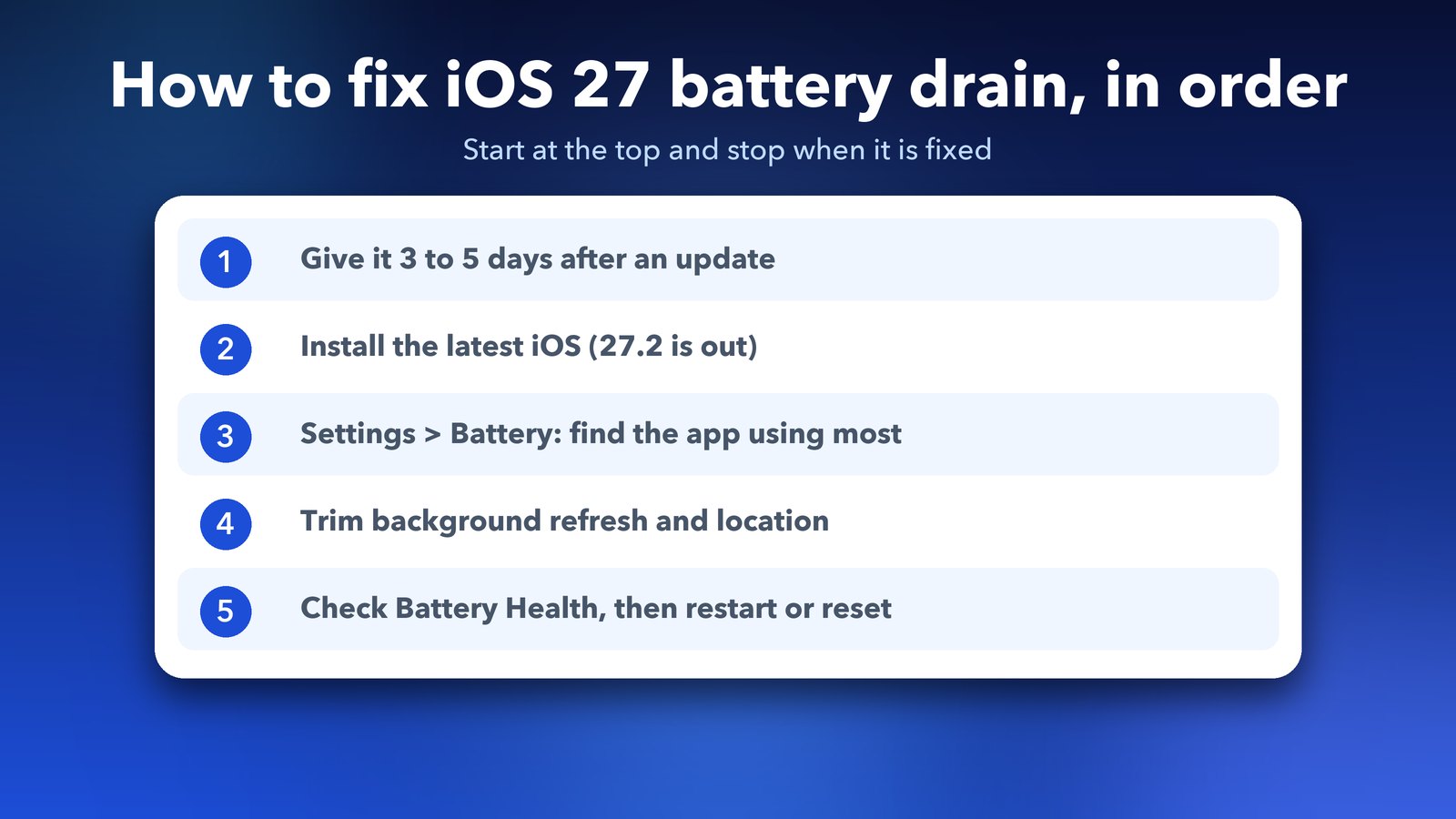
The short version is to wait a few days, update, find the app, trim the settings and check the battery. If you are on the new iPhone Duo, the screen has a different problem, which we cover in our guide to the iPhone Duo screen that cracks or shows lines. Older phones with the same complaint can also read our guide on iPhone battery drain on iOS 26, since most of the checks are the same.
Image credits: MacBook Air M4 render, iPhone 17 Pro vector (TheGoldenBox) and iPad Pro 11 mockup (Jem Riggs) from Wikimedia Commons (CC BY-SA 4.0), with illustrated screens. Icons and panels are original illustrations by Daily Techocracy. Sources: Apple Support (battery health, security releases) and Apple's battery performance page; user reports from Cybernews and TechSpot, treated as unconfirmed.