ChatGPT virtual try-on: how it works and how to use it
Hello Folks,
We at Daily Techocracy are back with some juicy info for all you kind readers....lets get to it !!
Ever bought a shirt online and found it looks nothing like the photo once it's on you? OpenAI is trying to fix that. On 1 October 2026, ChatGPT added a virtual try-on for clothes and accessories, plus a Favorites list to save what you find. Here's how it works, how to use it, and what to watch out for.
Quick answer: When ChatGPT shows clothes or accessories while you shop, you'll see a "Try on" button on the product. Tap it, take or upload a selfie, and ChatGPT creates an image of you wearing the item. You can save products to Favorites and folders in your ChatGPT Library. It works on mobile and on the web.
What is ChatGPT's virtual try-on?
It's a feature that uses ChatGPT's image tools to show you wearing a piece of clothing or an accessory. According to OpenAI's ChatGPT release notes, it arrived on 1 October 2026 on mobile and the web, alongside Favorites, folders and a new page-scanning tool.
The picture you get is made by ChatGPT Images from your photo and the product listing. It's a quick preview of how something might look. It isn't a mirror, and we'll come back to that below.
The release notes don't say which plans get it, so I can't tell you if it's open to free users. If you don't see the button yet, it may still be rolling out to your account.
How do I try on clothes in ChatGPT?
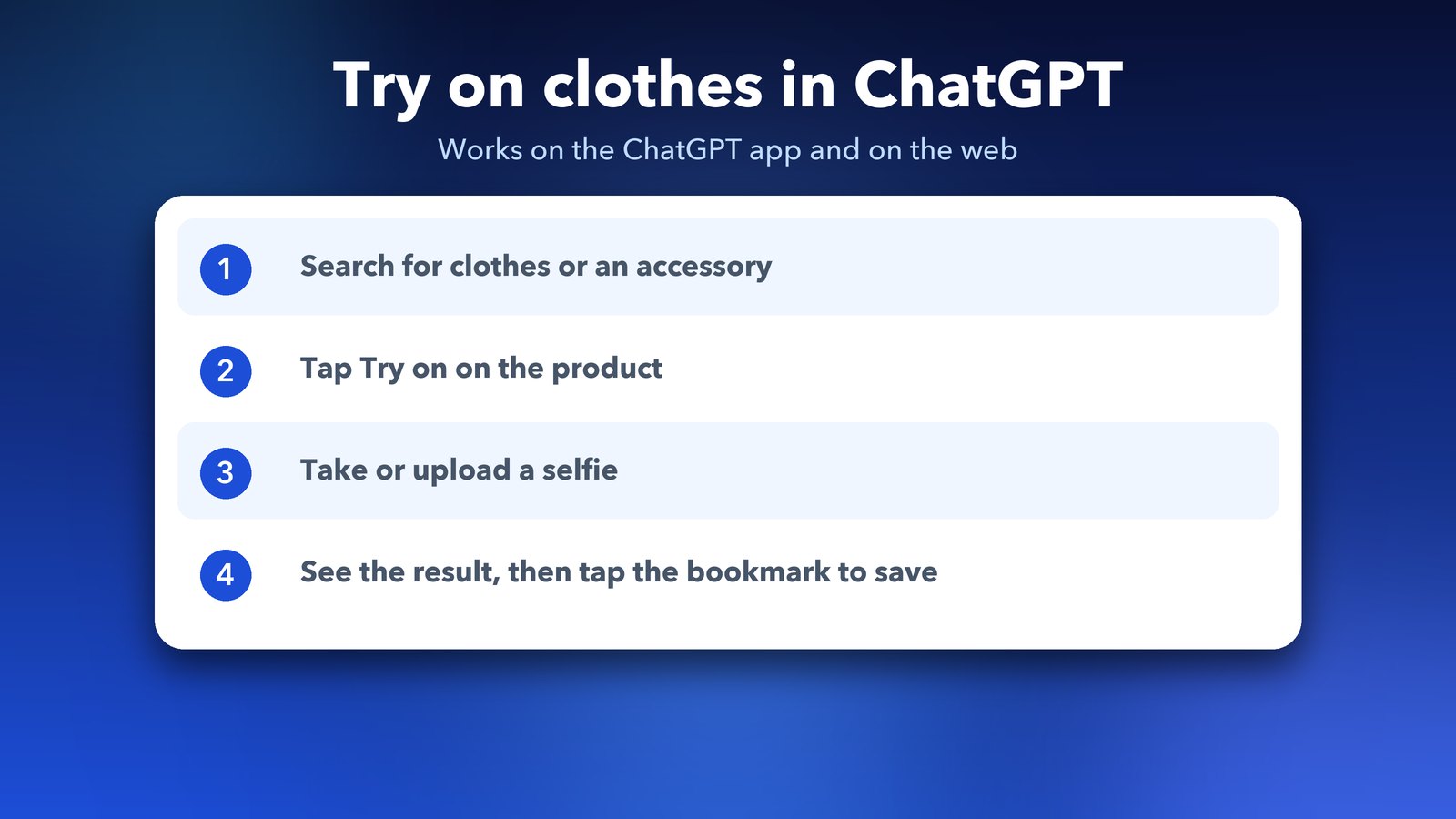
Ask ChatGPT to help you find clothes or an accessory, then tap the "Try on" button on the product you like. ChatGPT will ask for a selfie, and then it makes the try-on image.
- Open ChatGPT on the web or in the mobile app.
- Ask for what you want, for example "show me a navy blazer for work".
- Tap Try on on a clothing or accessory listing.
- Take a selfie or upload a photo of yourself.
- Look at the result. Tap the bookmark on the product if you want to keep it.
One report says you can also upload a screenshot of an item from any store and ask ChatGPT to try it on, so the product doesn't need to appear in ChatGPT's shopping results. I haven't tested this myself, so treat it as something to try rather than a promise.
How do I save clothes to Favorites in ChatGPT?
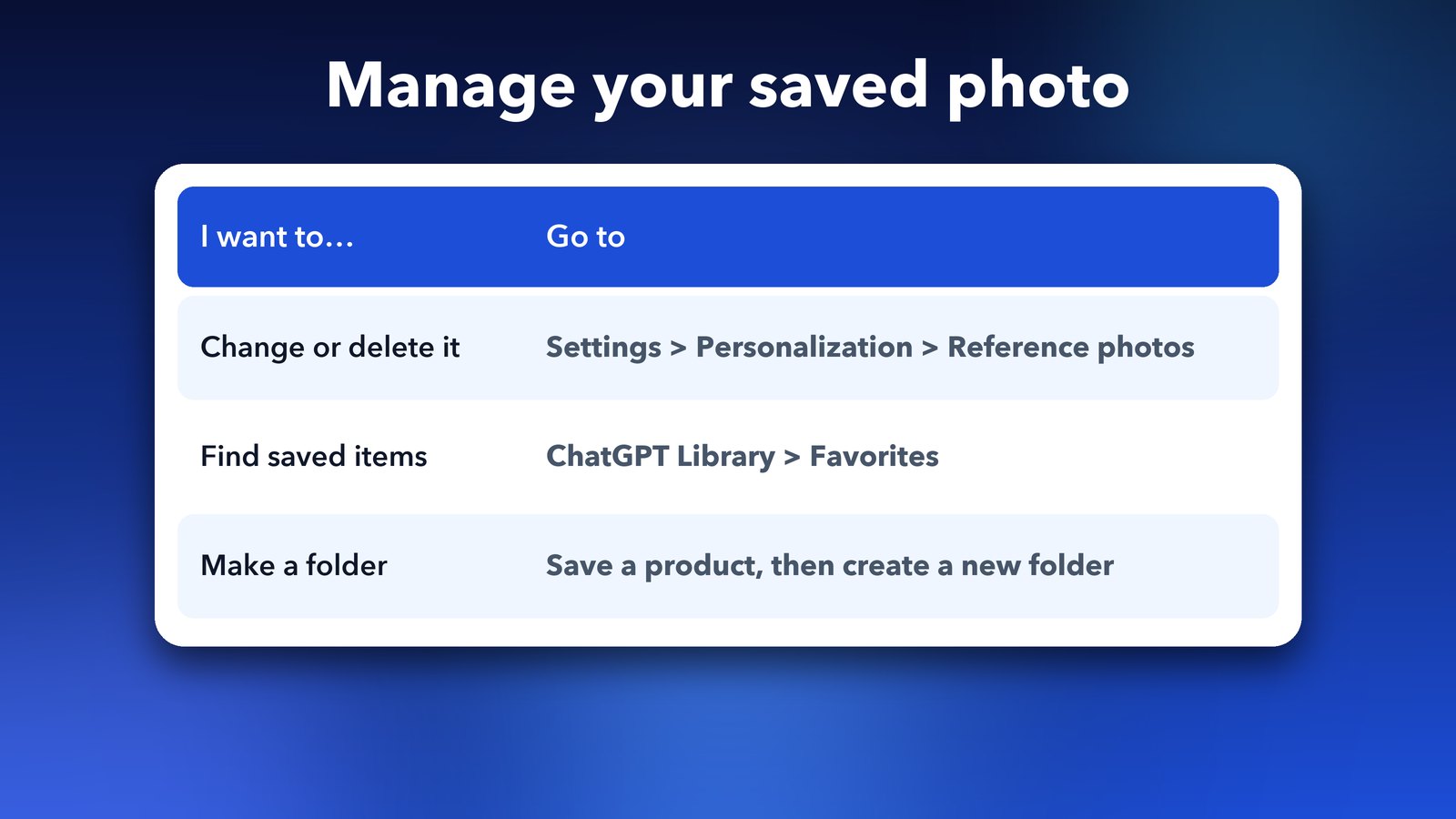
Tap the bookmark on a product to save it to Favorites. You can also make a folder, for example "Wedding outfits", to keep related finds together. Everything you save lives in your ChatGPT Library.
This is useful because shopping chats get long. Without Favorites, a jacket you liked an hour ago is buried in a conversation. With it, you can open your Library later and compare saved items side by side.
What happens to my selfie?
ChatGPT saves your photo so you don't have to upload it again for every try-on. You stay in control. You can change it or delete it in settings.
To manage it, open Settings > Personalization > Reference photos. If you'd rather not keep a photo of yourself in the app, delete it there after you've finished shopping.
How accurate is the ChatGPT virtual try-on?
It's a visual guide, not a guarantee. OpenAI says the image may not show the item or you accurately, and it doesn't promise fit or size. Cloth that hangs differently in real life can look different from the preview.
My advice: use it to rule things out. It's good for checking colour, style and how an outfit might look overall. Use the store's size chart and reviews to decide on size, and keep the store's return policy in mind before you buy.
What else did ChatGPT add in early October?
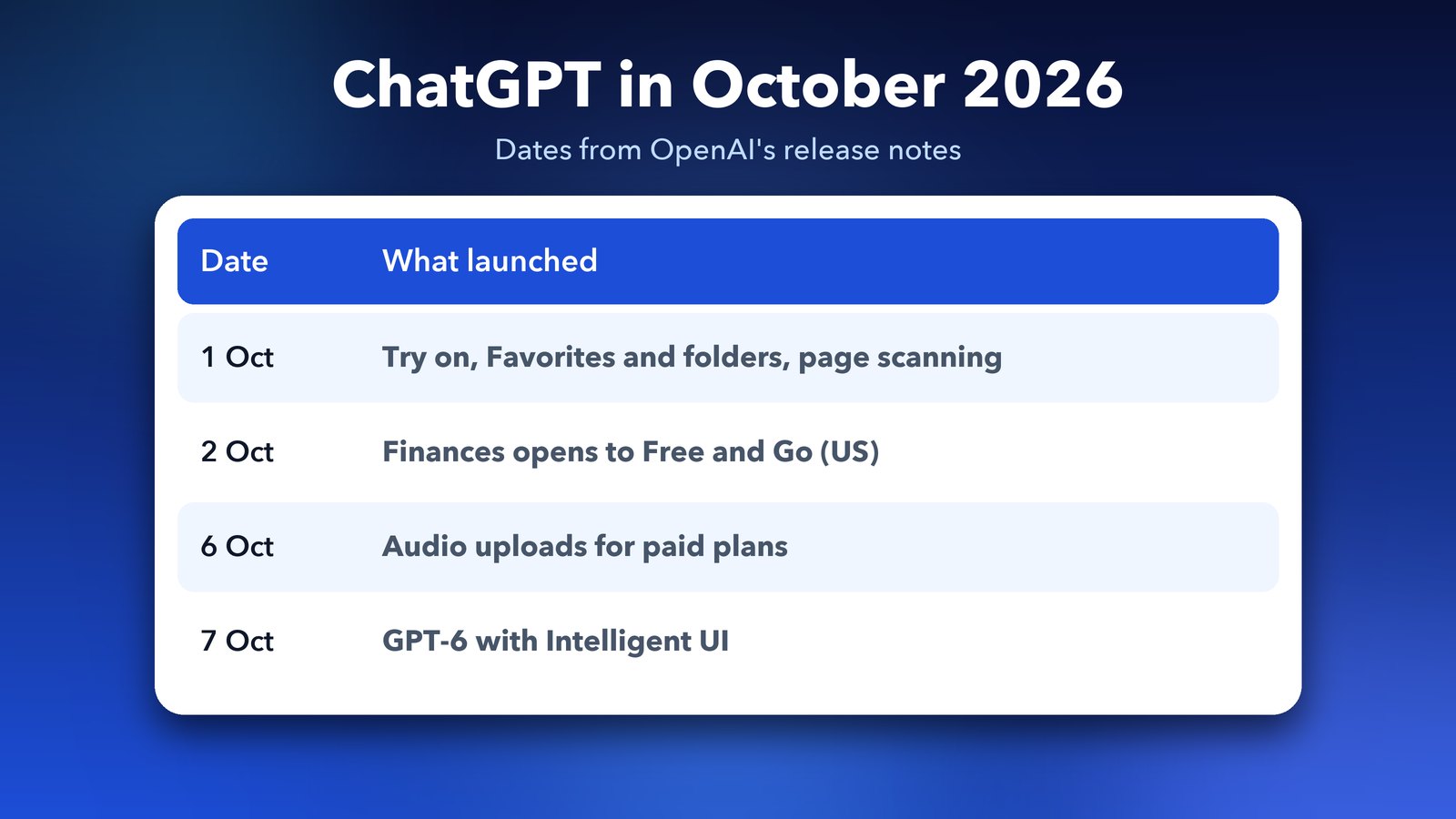
The try-on was one of several updates in the first week of October. Here's the short list from OpenAI's notes.
- Page scanning on iOS: open the camera, tap the three-dot menu and choose Scan. You can capture several pages and ChatGPT joins them into one PDF.
- Finances: rolling out to Free and Go users in the US, so you can connect accounts and look at your spending.
- Audio uploads: available on paid plans, for transcripts, summaries and notes.
- GPT-6 with Intelligent UI: answers with visuals and interactive tools. We covered it in our guide to GPT-6 in ChatGPT.
Is it worth using?
For a quick look at colours and styles, yes. It saves you from opening ten tabs, and Favorites keeps your shortlist tidy. Just remember you're looking at an AI picture, so don't let it replace the size chart. If you use ChatGPT for planning too, our post on ChatGPT Projects shows how to keep your chats organised.
For the original report on the launch, see TechRepublic's coverage.
Image credits: iPhone 17 Pro Max photo from Wikimedia Commons (CC0). ChatGPT logo by OpenAI, public domain, via Wikimedia Commons.