ChatGPT Slides: how it works and who gets it
Hello Folks,
We at Daily Techocracy are back with some juicy info for all you kind readers....lets get to it !!
Making a slide deck usually means jumping between a chat window, PowerPoint and a pile of files. OpenAI now wants you to do all of it inside ChatGPT. The new feature is called ChatGPT Slides, and it started rolling out on 16 October 2026.

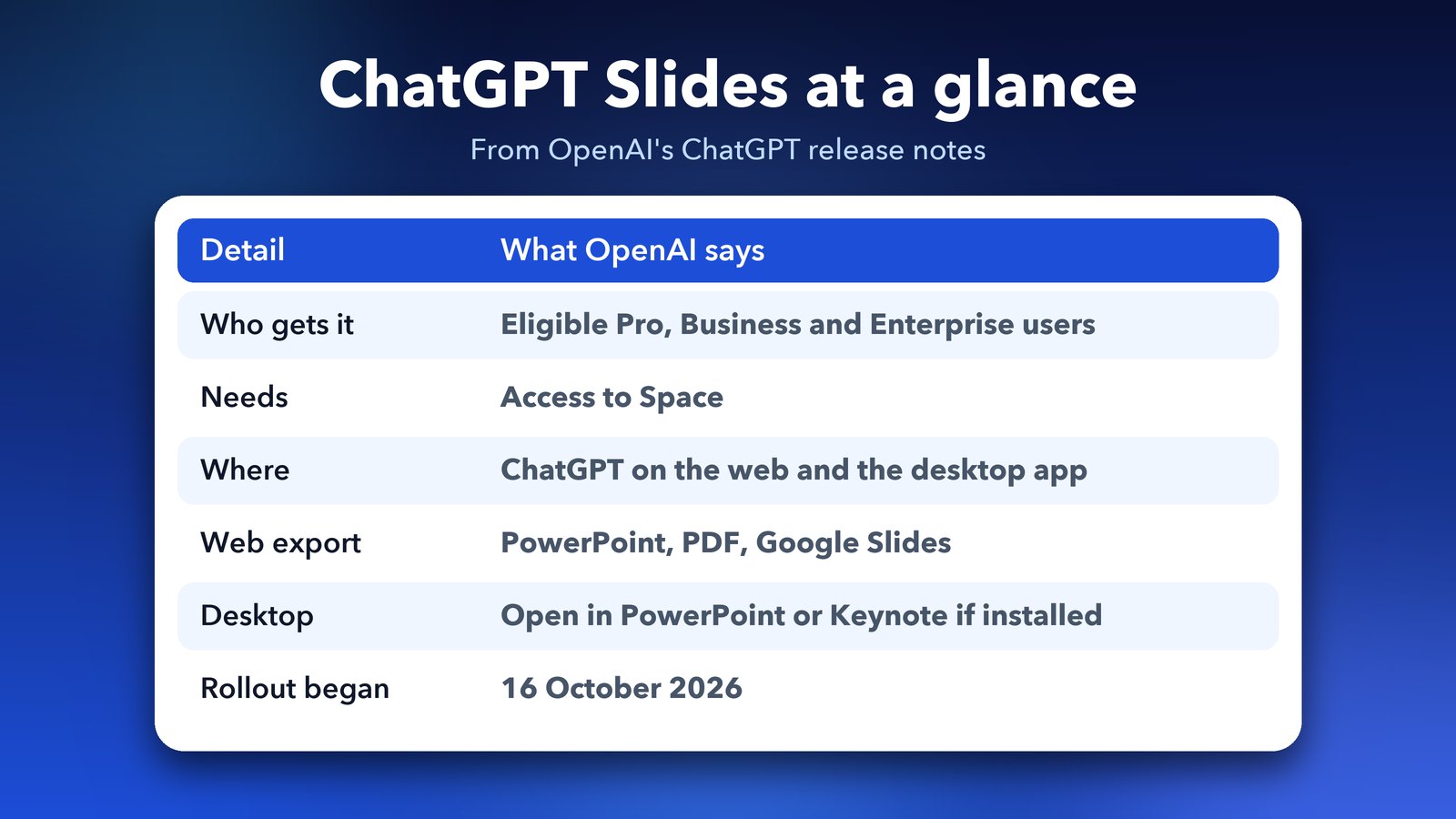
Quick answer: ChatGPT Slides lets you create, edit, present and share slide decks inside ChatGPT. It is rolling out to eligible Pro, Business and Enterprise users who have access to Space, on the web and in the desktop app. A free or Plus account is not on that list, according to OpenAI's release notes and the coverage that followed.
What is ChatGPT Slides?
ChatGPT Slides is a built-in deck maker. You can start from a conversation, from your files or from a simple outline, and you can also share an example deck so ChatGPT copies its style and layout. OpenAI's ChatGPT release notes describe it this way.
Once the deck exists, you can edit text, images, shapes and charts directly. Or you can ask ChatGPT to make the change for you. It can also make custom images, and you can add your own.
Who can use ChatGPT Slides?
Eligible Pro, Business and Enterprise users with Space access can use it. It is rolling out on the web and in the desktop app, so you may not see it on day one even if your plan qualifies.
Several outlets point out that a paid plan alone is not enough, and that Plus is not on the eligible list. One report lists Pro as the cheapest plan with Slides, but the price in that report did not match what I would expect, so check OpenAI's pricing page before you upgrade for this.
How do I start a deck in ChatGPT Slides?
Open ChatGPT, go to Work and ask it to create a presentation in Space. That is the starting point OpenAI gives in its notes. From there you can add files, an outline or an example deck.
- Open ChatGPT on the web or in the desktop app.
- Go to Work and open a Space.
- Ask ChatGPT to create a presentation in Space.
- Add your files, outline or an example deck.
- Edit the result, then export or present it.
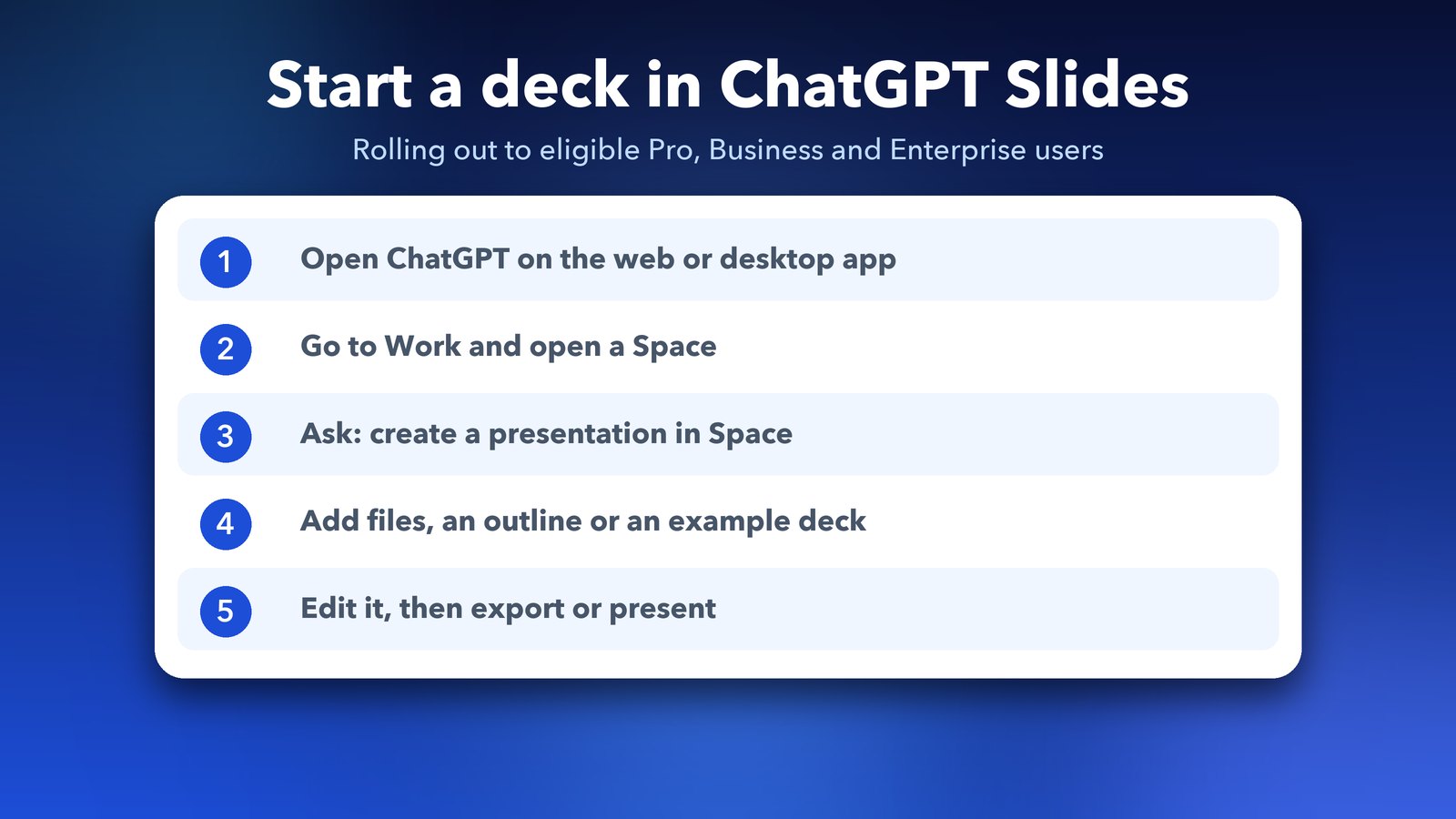
The exact buttons may look different on your account, because the feature is still rolling out. If "Space" is missing from your ChatGPT, that is the likely reason Slides isn't there yet.
Can I work on a ChatGPT Slides deck with my team?
Yes. Teammates can edit the same deck at the same time and leave shared comments. OpenAI lists this as one of the main points of the feature.
One analysis from Beri says decks follow the sharing rules of the Space they live in. So before you share a deck with a client, check who is invited to that Space. That is my practical tip, not something from OpenAI.
How do I export or present a ChatGPT Slides deck?
On the web you can export to PowerPoint, PDF or Google Slides. In the desktop app, you can open the deck in PowerPoint or Keynote if you have those installed. You can also present straight from ChatGPT.
This matters if your office still runs on PowerPoint. You can build in ChatGPT and still hand over a normal file at the end.
How is this different from ChatGPT for PowerPoint?
ChatGPT for PowerPoint is a separate add-in that works inside PowerPoint, and it was announced in May 2026 as a beta. Slides is different because the deck lives in ChatGPT itself. If you already love PowerPoint, the add-in may fit you better. If you want one place for chat, files and the deck, Slides is the new option.
Don't see ChatGPT Slides? Here's why
As of early November 2026, Slides is still only for eligible Pro, Business and Enterprise users with Space access. OpenAI started rolling it out on 16 October and is adding accounts gradually. If you don't see it, one of these is usually the reason:
- You're on Free, Go or Plus. These plans weren't part of the launch, and OpenAI hasn't given a date for them.
- Space isn't on your account yet. Slides lives inside Space, so no Space means no Slides.
- The rollout hasn't reached you. Try the web version at chatgpt.com as well as the desktop app.
On a free plan? The separate ChatGPT for PowerPoint add-in works with Free accounts, with limited use. It runs as a sidebar inside PowerPoint rather than building the deck inside ChatGPT, but it can still draft and edit slides for you.
Export tip: on the web you can export a deck to PowerPoint, PDF or Google Slides. The desktop app opens decks in PowerPoint or Keynote instead, and only if that app is already installed on your computer.
Should I use ChatGPT Slides?
If your workplace gives you Pro, Business or Enterprise with Space, try it on a small deck first. A first draft from your own notes is the easiest test. I would still read every slide before sending it, because AI decks can sound confident even when a number is wrong.
If you only have a free or Plus account, you don't need to rush. Other features rolled out this month may suit you better, such as the GPT-6 chat interface with buttons and charts or ChatGPT virtual try-on. And if you want to see how ChatGPT's agent side works, our post on ChatGPT Work explains it.
It is early days, so expect some changes over the next few weeks. We will keep an eye on it.
Image credits: MacBook Air M4 render from Wikimedia Commons (CC BY-SA 4.0), with an illustrated screen. ChatGPT logo from Wikimedia Commons; the logo belongs to OpenAI. Other graphics by Daily Techocracy.
Frequently asked questions
Is ChatGPT Slides free?
No. As of November 2026 it's for eligible Pro, Business and Enterprise users with Space access. Free users can try the separate ChatGPT for PowerPoint add-in instead, with limited use.
Can ChatGPT Plus users use Slides?
Not yet. Plus wasn't part of the 16 October 2026 launch, and OpenAI hasn't said when it will come.
How do I export a ChatGPT Slides deck to PowerPoint?
On the ChatGPT website, open the deck and export it to PowerPoint, PDF or Google Slides. In the desktop app, the deck opens in PowerPoint or Keynote if you have them installed.
Why don't I see Slides in ChatGPT?
Your plan may not include it, your account may not have Space yet, or the gradual rollout hasn't reached you. Check on chatgpt.com in a browser too.
Can my team edit a ChatGPT Slides deck together?
Yes. Teammates can edit the same deck at the same time and leave comments. Decks follow the sharing rules of the Space they're in.